

HawkAi platform: like ChatGPT, but with your knowledge
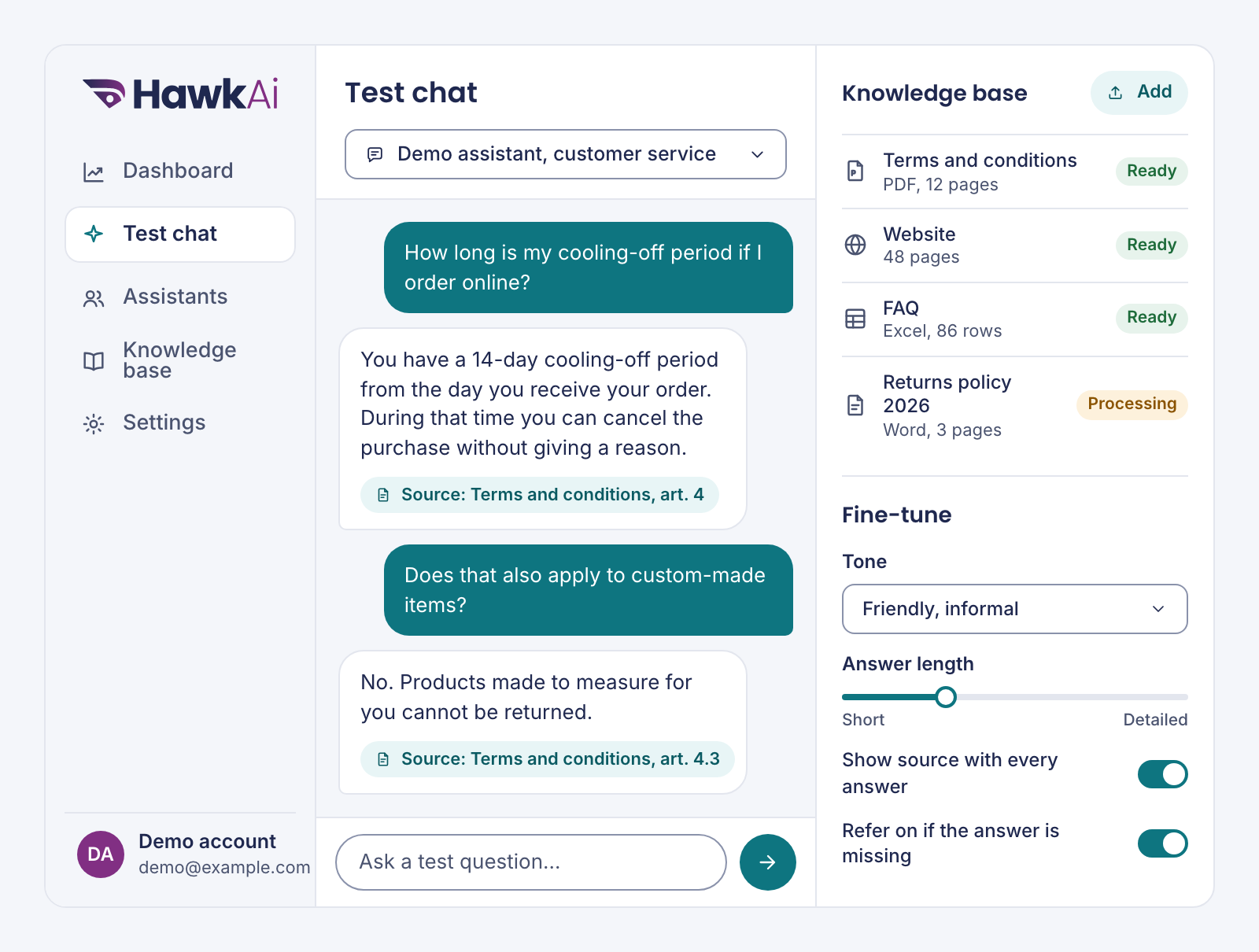
The HawkAi platform works like ChatGPT, with one big difference: it answers from your own documents, website and files. You put your knowledge into a knowledge base and use it to create one or more chatbots. You deploy them on your website, in WhatsApp or in your mailbox. We set it up with you.
What is the difference between ChatGPT and the HawkAi platform?
ChatGPT is good at wording things, but it doesn't know your business. It sometimes fills gaps in its knowledge on its own. The HawkAi platform uses the same kind of language technology, but takes its answers from your knowledge base: the documents, web pages and files you provide.
| Standard ChatGPT | HawkAi platform | |
|---|---|---|
| Where does the answer come from? | From general knowledge on the internet | From your documents, website and files |
| Does it know your terms and products? | No | Yes, as long as they're in the knowledge base |
| If the answer isn't in the source | Often gives an answer anyway | Says so and refers the question on |
| Source citations | Not to your documents | Every answer cites the documents the chatbot used |
| Where do you use it? | In ChatGPT itself | On your website, in WhatsApp, as an email draft or via a link or QR code |
| Personality and tone | Generic | Configurable per chatbot: name, tone, formal or informal |
| Insight into questions | No | Chat history with all questions and answers |
| Setup and support | Do it yourself | We set it up and refine it together with you |
What's included in the HawkAi platform?
Your team answers the same questions every day. The platform takes them over, leaving time for the customers who really need help. Here's what's included:
Your knowledge in one place
Knowledge bases with folders
You create a folder structure and upload your content. You link a chatbot to one or more folders.
Many types of sources
Web pages, PDF, Word, Excel, PowerPoint and other online content.
Automatic website updates
The platform periodically re-reads your website. A change on your site automatically finds its way into the answers.
Up-to-date data
The chatbot can use live data from your own source, such as a status. Then you don't need to update anything manually.
Configuring and testing your chatbot
Personality
You give each chatbot its own name, tone and character.
Test environment
In the playground, you try out the chatbot before it goes live.
Choice of language model
For each chatbot, you choose the language model that fits best.
Deploying your chatbot
- On your website as a chat window, or shared via a public link or QR code.
- In WhatsApp, so customers chat on the channel they already use.
- In your mailbox. Connect your business Gmail and the platform prepares a draft reply. You check it and send it.
- Custom integrations with your CRM, ERP or ticketing system. Read more about custom integration.
Seeing what people ask
Chat history
You read which questions are asked and what the chatbot answers. That shows you where an answer could be better.
Email notifications
After a chat ends, you receive the conversation in your mailbox, so you're immediately up to date.
How secure is the HawkAi platform?
Anyone searching for a "secure AI platform" mainly wants to know where the data is stored and who can access it. We discuss this in the first call, before a single document goes into the knowledge base.
HawkAi complies with the GDPR and ISO 27001 and protects data with encryption, access control and regular audits. Your data is stored in the EU, and HawkAi signs a data processing agreement with you.
The platform has an uptime of 99.99%. The chatbot only uses the sources you provide or connect.
How do we work?
Getting acquainted
We start with a free, no-obligation call about your goals and the questions your team receives.
Exploring and setting up
Together, we determine how the platform can best help you. We then prepare your documents and configure the chatbot.
Testing and launch
We test together with real questions, in rounds, until the answers are right. Then the chatbot goes live.
Support and aftercare
After launch, we keep an eye on things. We train your team and refine the answers.
Platform, integration or white-label: what suits you?
- Want a chatbot for your own customers or employees? Start with the platform and one channel. Read how an AI chatbot for customer service works.
- Does the chatbot need to use data from your own systems? Then add a custom integration.
- Want AI in your own product, under your own brand? Then we'll build a white-label assistant with you on the same platform.
Frequently asked questions
What makes the platform different from other AI tools? And what happens after launch? You'll find the answers below.
What makes HawkAi different from other AI solutions?
You don't get a standalone tool subscription, but a chatbot we set up together with you. We work in rounds, test with real questions and keep refining after launch. All channels run on the same knowledge base.
How much does the HawkAi platform cost?
The first introductory call is free. After that, you pay a one-off fee for the setup and then per interaction or per month. We don't list prices on the site, but we'll make a proposal that fits your channels and your number of questions.
How long does it take to launch a chatbot on the platform?
A standard chatbot goes live in about three weeks; custom integrations may take longer, depending on the system.
Does the platform work with our existing systems?
Yes. Website, WhatsApp and Gmail work out of the box. For your CRM, ERP or ticketing system, we build a custom integration, usually via an API.
What support do you get after implementation?
We remain available for questions, updates and refining the answers. We train your team so you can add content yourself and read the chat history.
Want to see the platform with your own documents?
Tell us which questions your team gets most often and which documents go with them. We'll show you how the platform answers them.