

AI chatbot for customer service
An AI chatbot for customer service is an assistant that answers customer questions using your own website, terms and conditions and manuals. Day and night, on your website, in WhatsApp or as a draft reply in your mailbox. Your team has time left for the questions that really need a human.
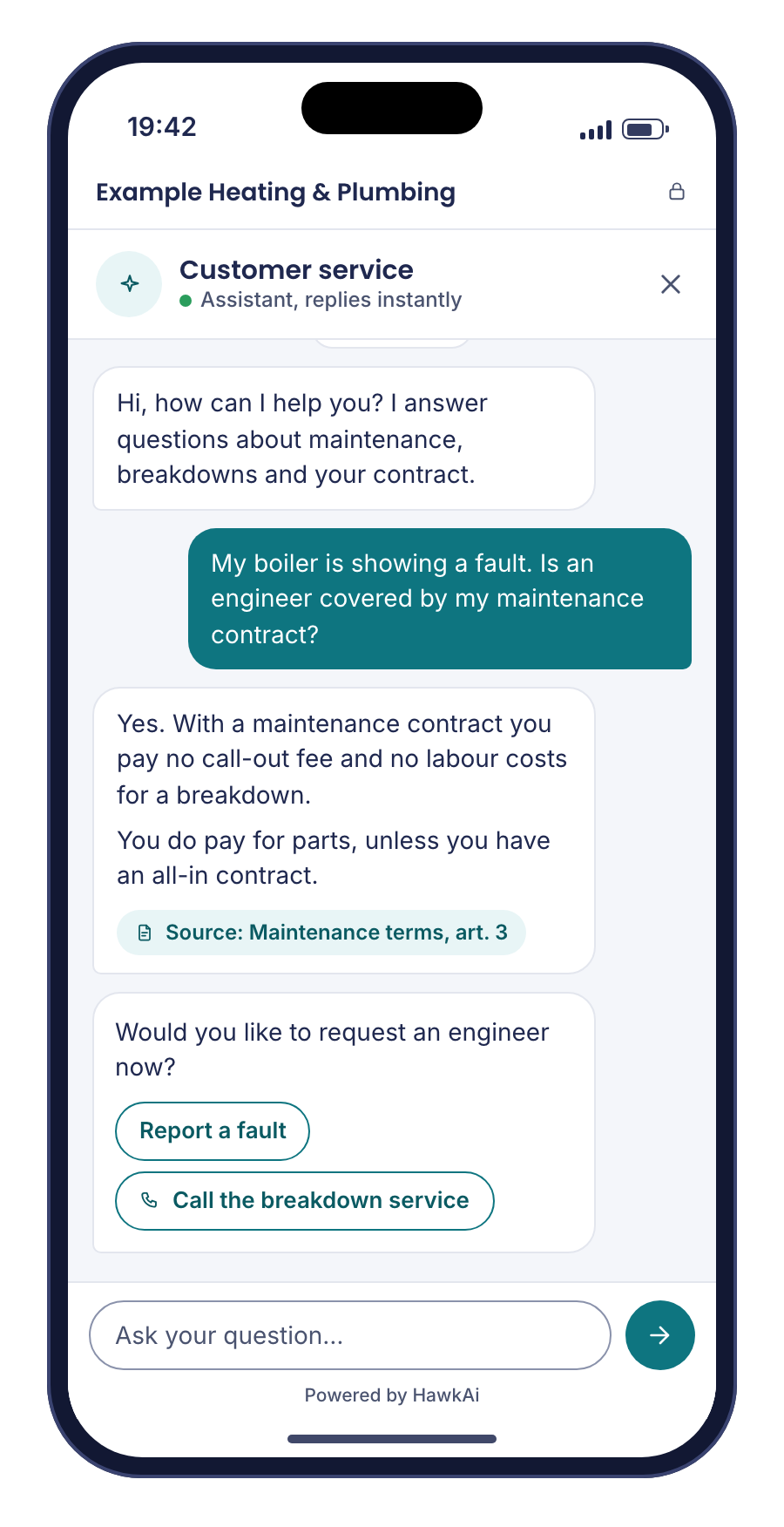
What does an AI chatbot do for your customer service?
Your team answers the same questions every day: about opening hours, delivery times or what's in the contract. Anyone searching for an "AI chatbot for customer service" usually wants to solve exactly that: fewer repetitive questions, without customers being helped any less well.
The chatbot reads along in your knowledge base. That's the collection of documents, web pages and files it draws its answers from. A customer asks a question in plain language; the chatbot looks for the answer in your sources and writes it up in clear sentences.
An example: a tenant wants to know their notice period in the evening. They don't have to wait until your office opens. The chatbot takes the answer from the tenancy agreement and explains it in two sentences.
You choose where the chatbot works. All channels use the same knowledge base:
- On your website, as a chat window alongside your pages: the FAQ chatbot.
- In WhatsApp, the channel your customers already have on their phones: the WhatsApp chatbot.
- In your shared mailbox, as a draft reply that you check and send: the email assistant.
- Via a link or QR code, for example in a letter, on a poster or in a course.
How does an AI chatbot for customer service work?
We set up the chatbot together with you. You don't need an IT team for it. These are the steps, in the actual order:
Getting acquainted
Together, we look at which questions your team gets most often and through which channel. That determines which documents the chatbot needs.
Filling your knowledge base
You supply your website, PDFs, Word and Excel files or PowerPoints. You can upload them yourself or send them to us. We prepare your documents for the chatbot.
Configuring and testing
We tune the chatbot to your tone of voice and your topics. We then review the answers together, in rounds, until they're right.
Going live
The chatbot goes onto your website, into WhatsApp or into your mailbox. At HomeTown, the road to launch took four weeks.
Refining
You see which questions customers ask and where an answer could be better. If information is missing, we add it to the knowledge base.
What is the difference between an AI chatbot, a decision tree and ChatGPT?
A classic chatbot follows a fixed script with buttons. Standard ChatGPT is good at wording things, but doesn't know your business. An AI chatbot built on your own knowledge base combines the two.
| Decision-tree chatbot | Standard ChatGPT | AI chatbot on your own knowledge (HawkAi) | |
|---|---|---|---|
| How does it answer? | With fixed texts from a script | With general knowledge from the internet | With information from your documents and website |
| A question that isn't in the script | Gets stuck or sends the customer back to the menu | Gives an answer, even if it doesn't know | Searches your sources and refers the question on if the answer isn't there |
| Does it know your terms and products? | Only what you've written out yourself | No | Yes, as long as they're in the knowledge base |
| Setup | Write out every question and every path separately | Not needed, but it can't be customised either | Supply documents, then test and refine together |
| Maintenance | Every new topic is a new path | Not possible | Add a new or updated document |
| Channels | Usually only the website | Only in ChatGPT itself | Website, WhatsApp, email and link or QR code |
| Languages | A separate script per language | Many languages | Answers in the language of the question, even if your sources are in one language |
When does a team member take over?
A good chatbot knows what it doesn't know. If the answer isn't in your sources, the chatbot says so. It refers the customer to your team, for example to the contact form, the phone number or email.
Combine chatbot and human in your customer service: the chatbot handles the routine questions, your team the rest. Think of a complaint, an exception to the rules or a customer who simply wants to talk to someone. Want a referred question to go straight into your CRM or ticketing system? That's custom work: HawkAi can build that integration with your CRM or ticketing system for you.
To be fair: HawkAi isn't a live chat tool or a full ticketing system. If you're looking for a contact centre where staff chat along themselves, another package is a better fit. The chatbot is designed to work alongside your existing mailbox, website and systems.
What does an AI chatbot deliver for your customer service?
A chatbot doesn't take over work that people do better. It handles the questions that keep coming back. That mainly delivers this:
Available outside office hours
Customers get answers in the evening and at weekends, on the channel they already use.
Fewer repetitive questions for your team
Your staff have time left for the difficult questions and for the customers who really need help.
The same answer every time
The chatbot takes its answer from the same sources. So two customers with the same question don't get different explanations.
More languages without extra staff
You supply the information in one language. The chatbot answers in the language the question was asked in.
Insight into what customers ask
You see which topics come up often. That also tells you which text on your website or in your letters is unclear.
At HomeTown in Utrecht, tenants often didn't fully understand their tenancy agreement. That led to lots of questions, especially during peak hours. The chatbot answers questions about the contract and general policies, in Dutch and English.
What are the limits of a customer service chatbot?
A chatbot isn't the right solution for every question or every business. These are the limits we discuss with you up front:
The answers are only as good as your sources
If a document is wrong or two sources contradict each other, you'll notice it in the answers. That's why we test together before the chatbot goes live.
Sensitive conversations belong with people
For a complaint, bad news or a personal situation, the chatbot refers the customer on.
Few questions, little gain
If your team only gets a handful of questions per week, a chatbot won't deliver much.
How much does an AI chatbot for customer service cost?
The costs depend on three things: the one-off setup, the number of channels and the number of interactions. An interaction is one question with one answer, or one email with one draft reply.
You pay per interaction or per month, with no expensive up-front licence. Read How much does an AI chatbot cost? to see which factors count. There, you'll also see how to weigh the costs against the time your team currently spends.
Which chat solutions for businesses does HawkAi offer?
We build customer service chatbots on one platform. You start with one channel and expand later, using the same knowledge base.
FAQ chatbot
answers frequently asked questions on your website, also for your own employees.
WhatsApp chatbot
answers questions in WhatsApp, day and night.
Email assistant
prepares draft replies in your shared inbox.
Integrations
connects the chatbot to your CRM, ticketing system or mailbox.
Frequently asked questions
What if the chatbot doesn't know the answer to a question? And what happens to your data? Below are the questions we get most often.
Can a chatbot provide customer service that's as good as your team's?
For the questions that keep coming back: yes. The chatbot gives the same answer as your team, but instantly and outside office hours too. The chatbot refers difficult or personal questions to your team.
How do you prevent wrong answers?
The chatbot only answers from the sources you provide. Before launch, we test together with real questions from your customers and refine the answers. After launch, you see which questions are asked, so you can add any missing information. With every answer, the chatbot shows the source it came from.
How do you provide AI customer service that doesn't annoy customers?
Let the chatbot be honest that it's a chatbot, and let it refer customers on when it doesn't know the answer. Keep the answers short. And make sure customers can always reach a human.
What happens to our data and our customers' data?
Your data is stored in the EU and processed in accordance with the GDPR. HawkAi signs a data processing agreement with you. In the first call, we discuss which information goes into the knowledge base and who can access it.
How quickly can an AI chatbot go live?
That depends on the number of channels and the volume of documents. A chatbot for one channel goes live in about three weeks. An integration with your own systems takes more time than a chat window on your website.
Do we need to replace our current systems?
No. The chatbot works alongside your website, your WhatsApp number and your mailbox. We connect Gmail out of the box; for your CRM, ERP or ticketing system, we build a custom integration.
Which languages does the chatbot work in?
The chatbot answers in the language the customer asks the question in. You only need to supply your information in one language.
Who is behind HawkAi?
HawkAi is a brand of HRorganizer, an HR tech provider for 20 years. We set up your chatbot, connect it to your systems and refine the answers together with you.
What we really liked is how HawkAi thinks along about solutions and is keen to achieve a great result together.
Curious which questions your chatbot can take over?
In a no-obligation call, we look at which questions your team gets most often and which channel fits. Afterwards, you'll know whether a chatbot makes sense for you.