

Email assistant: draft replies in your shared inbox
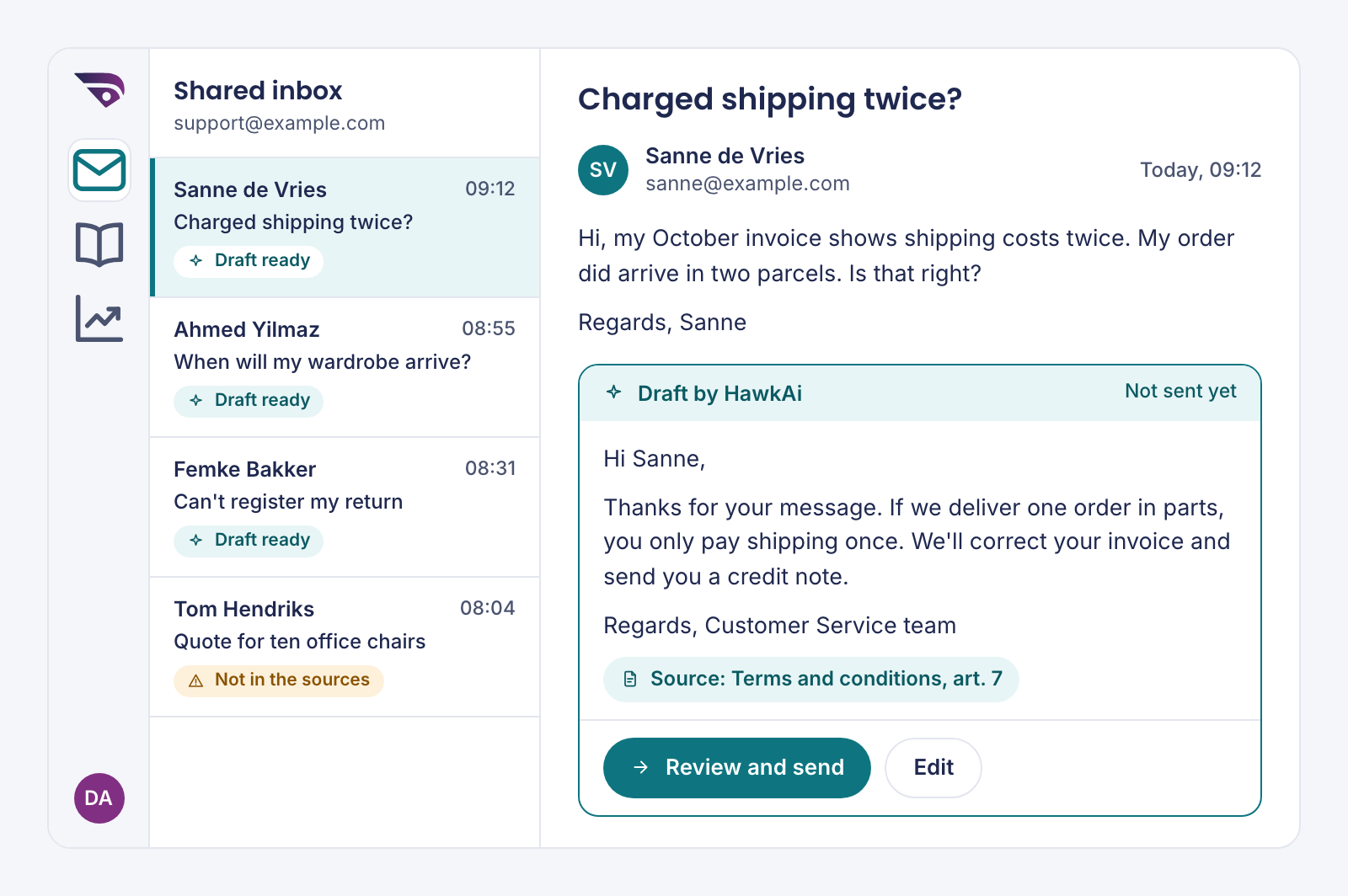
HawkAi's email assistant reads the emails that come into your shared inbox and prepares a draft reply for each one. It writes that draft based on your own documents and website. Your team member checks it, adjusts it if needed and clicks send.
Why an email assistant?
Many customers still prefer email to chat. That means the same questions land in the shared inbox every day: about an invoice, a delivery time or a clause in the terms and conditions. Your team looks up the answer, types it out and starts all over again with the next email.
The email assistant takes over the looking up and the first draft. Your team stays in control, because nothing goes out without a team member having read it.
Faster replies
The draft is ready when you open the email. All you have to do is check it.
A human always reviews
The assistant never sends anything itself. That makes it suitable for teams that want to review every email.
The same answer to the same question
The draft comes from the same sources. So two colleagues don't each give their own explanation.
Less work during peaks
After a mailing or a change in your terms, lots of similar questions arrive at once. Then every prepared draft saves time.
Insight into what customers ask
You see which topics come up often and which information is still missing.
How does the email assistant work?
Getting acquainted
Together, we look at your inbox: which questions come in most often and what answers do you give?
Filling your knowledge base
You supply the documents that contain the answers, such as your website, terms and conditions, manuals or a list of standard replies. We prepare them for the assistant.
Connecting to your mailbox
An integration with Gmail works out of the box. Using a different email system or a ticketing system? Then we build a custom integration.
Testing and refining
Together, we review the drafts on real emails. We tune the assistant to your tone until the drafts are right.
Going live
Your team gets a draft for every new email. If information is missing, we add it to the knowledge base.
When do you choose an email assistant, and when a chatbot?
Choose the email assistant if most questions come in by email and you want to check every reply. Choose an FAQ chatbot on your website if you want to give visitors an instant answer, without them having to email.
You don't have to choose: both use the same knowledge base. You start with one channel and add the other later. Read more about the options in the explanation of the AI chatbot for customer service.
Frequently asked questions
Does the assistant send emails itself? And does it work with your email client? You'll find the answers below.
Does the email assistant send replies itself?
No. The assistant only prepares a draft. A team member reads it, adjusts it if needed and sends it themselves.
Which email clients does the email assistant work with?
Gmail works out of the box; Outlook and Microsoft 365 are in development. For other systems, such as a ticketing system, we build a custom integration.
What happens if the answer isn't in the documents?
If the answer isn't in the sources, the assistant doesn't prepare a content draft but a notification for the team member. That way, you immediately see which information you can add to the knowledge base.
Can the assistant reply in my own tone of voice?
Yes. We tune the assistant to the way you currently write emails: formal or informal, with your usual form of address and your standard sign-off.
Which languages does the assistant write in?
The assistant replies in the language the email was written in. Your documents only need to be in one language.
How much does the email assistant cost?
You pay a one-off fee for the setup and then per interaction or per month. One interaction is one incoming email with one draft. We don't list prices on the site; you get a price that fits your email volume.
Want to see what the drafts look like for your inbox?
In a no-obligation call, we look at the emails your team gets most often. Afterwards, you'll know what the assistant can do for you.